Delphin Guide
OpenAI Images 2.0 API Integration Guide
Learn how to integrate OpenAI Images 2.0 into a website, what is officially supported today, and how to judge production feasibility before you ship.
Why This Guide Matters
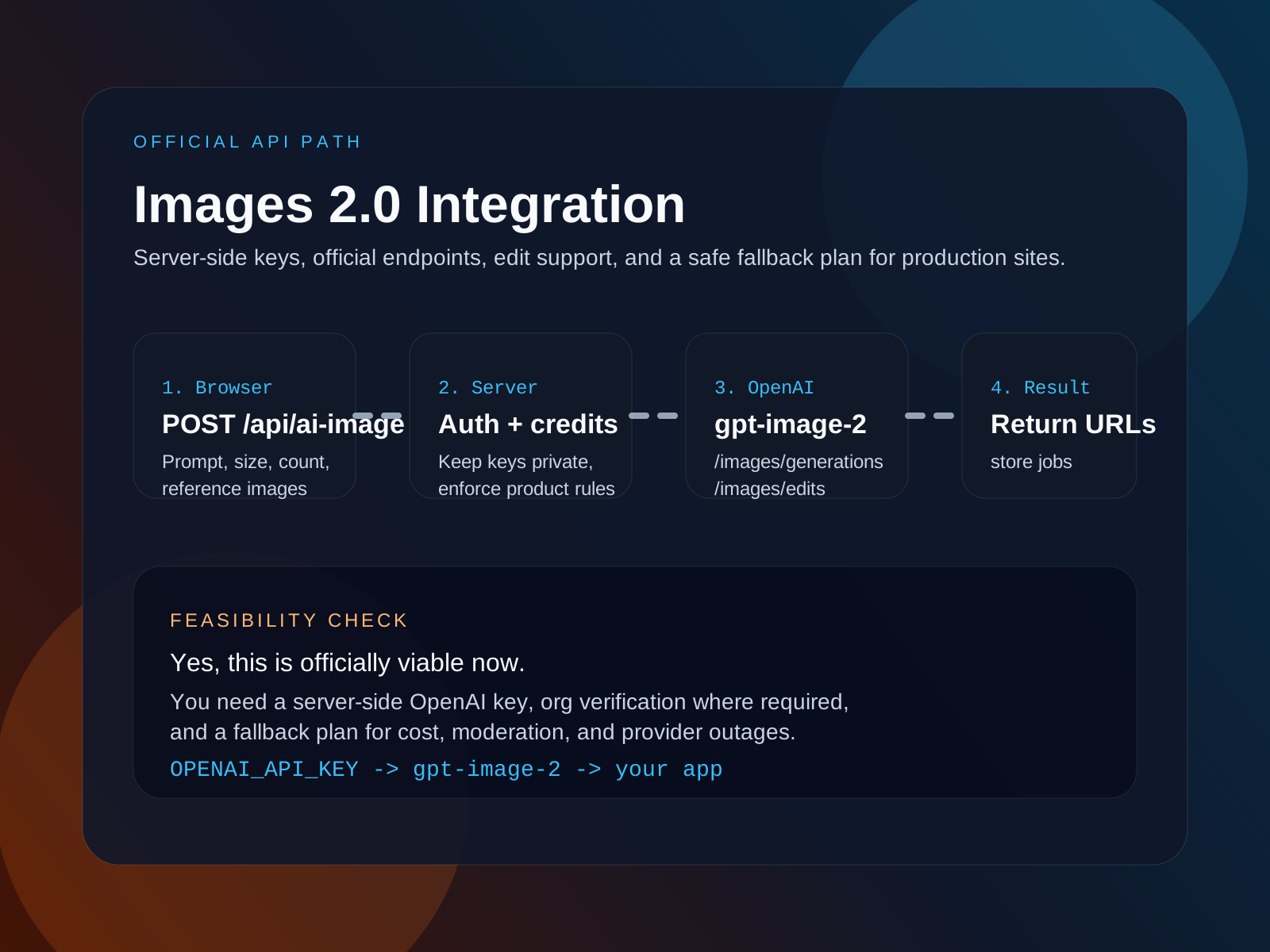
The short answer is yes: as of April 22, 2026, there is an official OpenAI path for website-integrated image generation. The product-facing name is ChatGPT Images 2.0, but the developer-facing model path is gpt-image-2 through the Images API. That means the question is no longer whether this can be done officially. The real question is how you want to structure it safely and economically.
How To Use This Workflow
1. Use a server-side adapter, never a browser-side key
Your site should call your own backend route first, then your server should call OpenAI so authentication, credits, moderation, and audit logic stay under your control.
2. Handle prompt-only and edit flows separately
Prompt-only requests should go through image generation, while reference-image requests should route into an image edit flow with stronger input preservation.
3. Prepare an operational fallback plan
Even with an official API, you still need cost controls, rate limits, and a backup provider strategy for high-volume or outage-sensitive products.
Short answer: yes, official integration is viable
OpenAI's current documentation supports official image generation and image edits. In practical terms, that means you can build a website flow where users submit prompts or reference images to your app, your server calls OpenAI, and your product stores the resulting assets or job records just like any other media workflow.
This matters because a lot of image launches are either demo-only or consumer-only. Images 2.0 is different in that the official developer story exists right now.
- Product name: ChatGPT Images 2.0
- Developer model path: gpt-image-2
- Official support includes both generation and edit flows
- Organization verification may still matter for access in some cases
How the integration should be structured
The safest integration pattern is straightforward: the browser sends requests to your own API, your API validates the request and user, then your server calls OpenAI. That keeps your OpenAI key off the client and gives you a place to enforce product rules before a request reaches the model.
Prompt-only generation
Use this when the user starts from text. Normalize the prompt, map your UI size options to OpenAI-supported output sizes, send the request to the official generation endpoint, then return the resulting image URLs or base64 assets to the frontend.
Reference-image edit flow
Use this when the user uploads an existing visual. Fetch or persist the reference image server-side, then forward it through the official image edit route so the result stays tied to the user's actual input rather than starting from scratch.
Storage, billing, and moderation
Store generation jobs in your database, track credits before you call OpenAI, and decide how much moderation or prompt filtering belongs at your app layer versus the provider layer. This is where a thin adapter architecture helps a lot.
Why this codebase can support it cleanly
This codebase already uses an image adapter registry, server-side API routes, job persistence, and credit accounting. That means the official OpenAI path is not a ground-up rebuild. It is mostly an adapter decision plus a few provider-specific mapping rules.
- The `/api/ai-image` route already handles auth, validation, credits, and job storage.
- The adapter layer already switches image providers based on `modelId`.
- Reference images are already represented in the request shape.
- This makes official OpenAI support a low-risk extension rather than a new subsystem.
Current feasibility checklist
Before shipping, a product team should answer a few operational questions. These are the difference between a cool internal prototype and a reliable public feature.
- Do we have a server-side OpenAI key and a safe secret-management path?
- Do we know whether organization verification is required for our account?
- Have we tested cost per image against our credit or subscription model?
- Do we have a moderation policy for user-entered prompts and uploaded references?
- Can we tolerate fully synchronous responses, or do we need a queued UX?
When to keep a fallback provider
Even when the official path is the preferred one, keeping a fallback is still a healthy engineering choice. It gives you negotiating room on cost, lets you serve less demanding use cases with cheaper providers, and protects the product if one provider has an outage or access issue.
- Use the official OpenAI path for high-value or precision-sensitive requests.
- Use a fallback provider when cost or burst traffic matters more than perfect control.
- Keep the fallback behind the same adapter interface so your frontend never changes.
FAQ
Can my website call OpenAI directly from the browser?
It should not. Keep the OpenAI key on your server and let the browser talk only to your own backend route.
Do I need a brand-new architecture to add OpenAI image support?
Not if your product already has a provider adapter layer. In this codebase, it fits naturally into the existing server-side image generation flow.
Is image editing officially supported or only raw generation?
OpenAI's current documentation supports both generation and edit workflows, which makes the integration far more practical for real products.
Should I still keep another provider connected?
Usually yes. A fallback provider helps with resilience, cost control, and capacity planning even when OpenAI is your preferred path.